
How do I add credit hours?
You can now add credit hours to a course to clearly communicate the learning value or academic weight of the course to learners. This is specifically relevant for learner facing landing pages.
Where to add credit hours
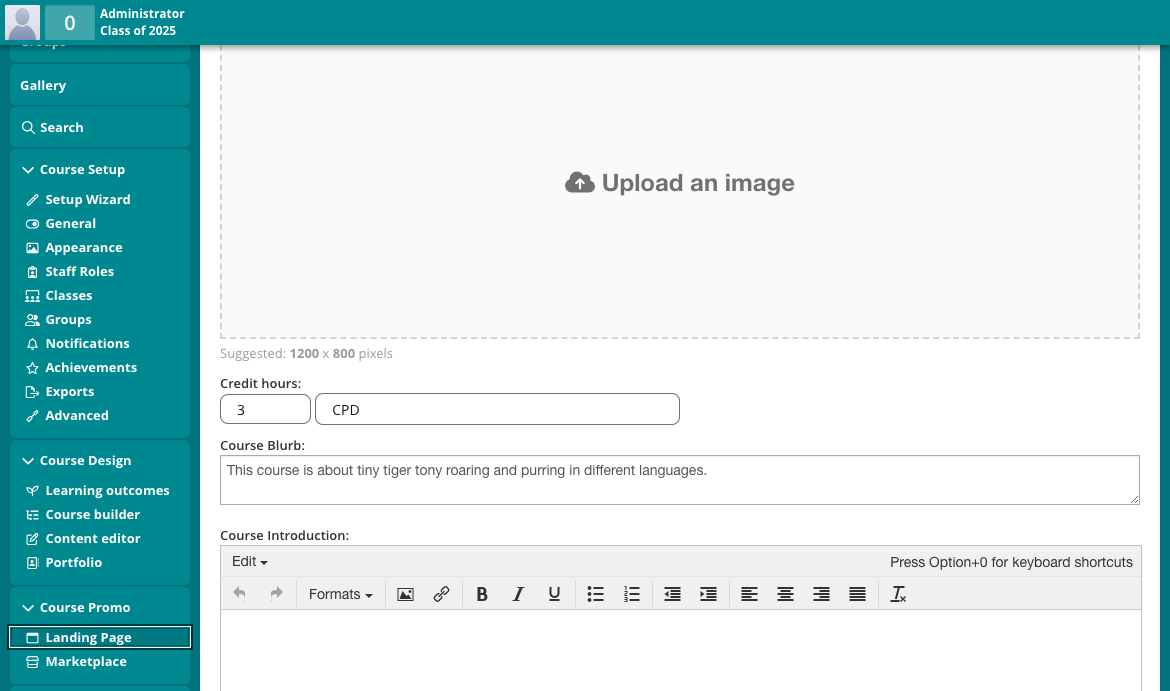
Go to Course Setup
Navigate to Course Promo → Landing page
Enter a value in the Credit hours field
Where are credit hours shown?
Once added, credit hours will automatically appear in:
Course Landing Page (as part of the course information)
Program Landing Page, within the Program Connector Diagram section (when the course is part of a program)
This helps learners better understand how courses contribute to a broader program or learning pathway.
When are credit hours not shown?
If the Credit hours field is left empty, it will not be displayed anywhere across the platform.
This allows you to optionally show credit hours only when they are relevant.