
Displays "Incorrect, Try Again" for long answers
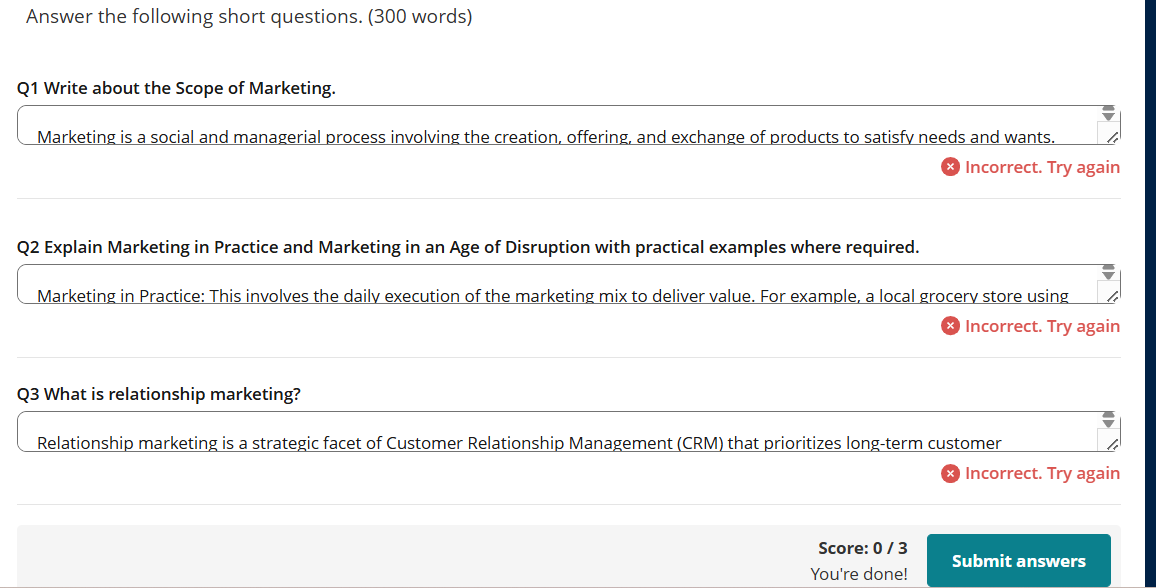
In the “Check Your Progress” section at the end of the module, when attempting the long/short written answer questions, the system displays the message “Incorrect, Try Again” immediately after submission.
As per the guidelines, these long/short answers are supposed to be reviewed and evaluated manually by the faculties. Hence, I wanted to understand why the system is marking the responses as incorrect instantly upon submission. I also tried submitting different answers, but the same message continues to appear.
For reference, I have attached the screen shot here.
Please review and let me know if I am missing any instructions or relevant information regarding this.
5 replies
-
hi Can you share the course link so we can check this for you? It would also help to have the page name or the direct link to where the activity is located.
-
Hi We have looked into the "Check Your Progress" section and found that the activity is currently set up using a short answer widget that requires specific keywords to match. Because the platform looks for an exact textual match, it automatically marks responses as "Incorrect" if those precise words are missing—even if your answer is conceptually accurate and phrased differently.
We are reaching out to the course administration team directly to notify them of this limitation. Their contact is online@gujaratuniversity.ac.in Mobile (WhatsApp) +919773405509 .
You can also reach out to them directly to notify them of this limitation and the issue you are facing to help speed up the update.
-
Hello , I am facing similar issue (Incorrect Answer in Long/short Question) in Check Your Progress part in the below given section:
URL: https://www.online-gu.com/courses/literature-and-language-i/check-your-progress/?cl=1
Also, there is an issue with the MCQ: ‘And all but he departed!’ Who is ‘he’ in this line?
In this MCQ, the options are contradictory. Option B and Option D. As per system, Option D is correct. The Option B is "None of the above" and Option D is "a and b both."
Please look into it.