
How to Set Up Course Completion Criteria
What is Course Completion Criteria?
Course Completion Criteria is a feature that lets educators and course administrators define exactly what a learner needs to do to be considered "complete" in a course. Instead of completion being automatically tied to 100% progress through learning activities, you can now set richer requirements — such as achieving a minimum grade or completing specific graded items. These criteria become the single source of truth for certificates, prerequisites, and reporting across your course.
Why use Course Completion Criteria?
Setting clear completion criteria gives learners full transparency into what they need to achieve — and ensures that certificates, prerequisites, and reports all reflect a meaningful, consistent definition of success across your course
Use cases
A vocational training provider wants learners to complete at least 80% of learning activities and achieve an overall passing grade before being awarded a certificate.
An Educator running multiple classes of the same course wants one class to require a passing score, while a pilot class has a lower threshold — without affecting each other.
A university administrator wants specific graded assessments to be completed before a learner is marked as course complete, regardless of their overall grade.
A competency-based course needs learners to achieve overall competency (rather than a numeric score) before completion is recognised.
An educator wants learners to be able to check their own progress toward completion at any time, reducing the number of enquiries sent to the teaching team.
Note: Completion criteria are configured at the class (cohort) level, not the course level. This means different classes within the same course can have different completion requirements. Make sure you're working within the correct class before you begin.
How to set up course completion criteria
Step 1
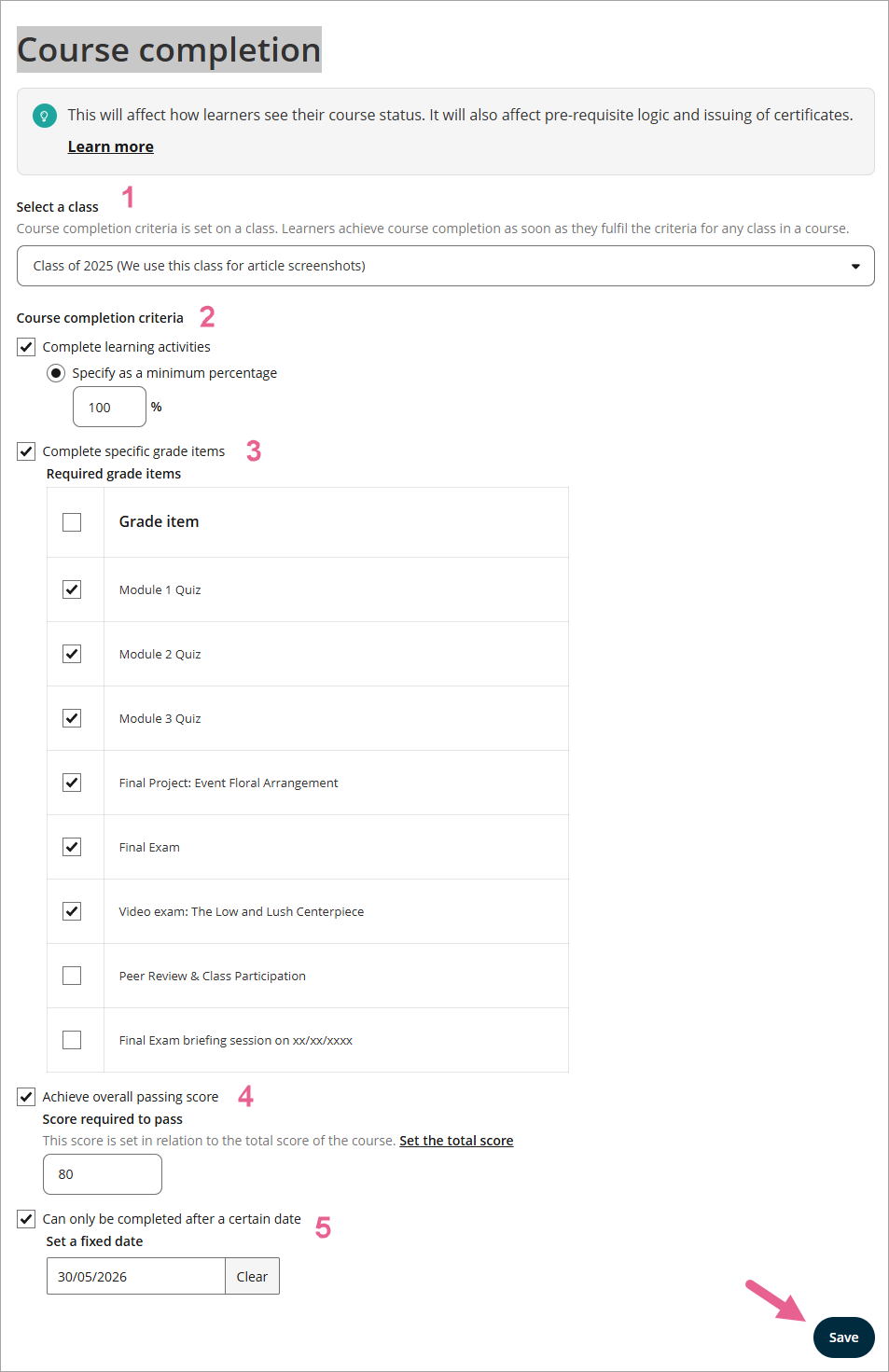
Go to Course Setup > Course Completion Criteria.

Step 2
Enable the criteria you want to apply by ticking the relevant checkboxes. You can enable one or more of the following independently:
1) Select a class: Select the class you want to set completion criteria for from the Select a class drop-down menu.
2) Learning Activities: Set a minimum percentage of activities a learner must complete (default is 100%).
3) Grade Items: Select specific graded items from a checklist that learners must complete.
4) Score required to pass: Require learners to achieve an overall passing score (for score-based courses) or achieve overall competency (for competency-based courses).
5) Date: Select a specific calendar date after which the learner can complete.
Step 3
Configure the settings for each enabled criterion—for example, entering the minimum activity percentage or the passing score threshold.
Step 4
Save your settings using the Save button.
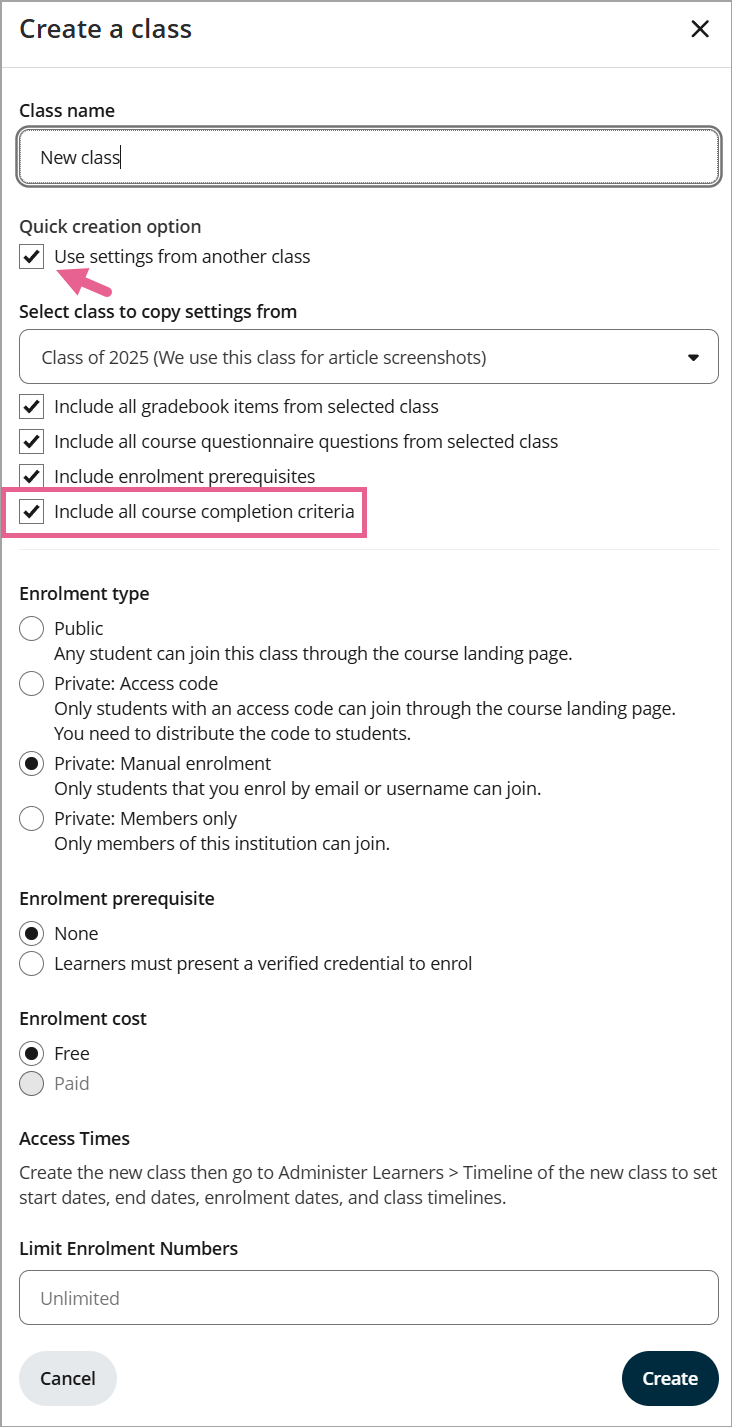
 Protip: Setting up a new class?
When using the Create a class dialog, you can opt to copy completion criteria from an existing class alongside other class settings like gradebook items and pre-enrolment survey questions.
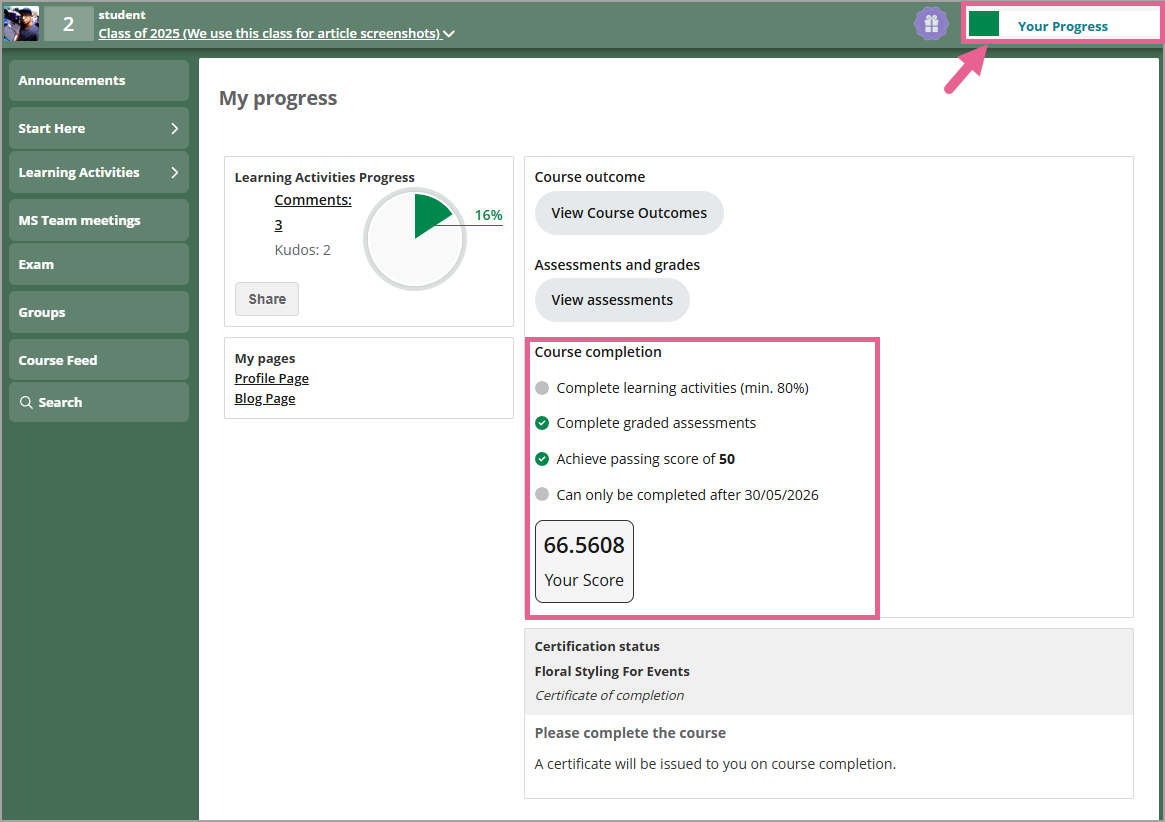
What do learners see on their end?
To check what learners will see, navigate to the learner's My Progress page — each criterion will appear with a clear met/not met status indicator.
Frequently asked questions
How do completion criteria affect certificates?
Certificates are now linked to completion criteria. When a learner meets all configured criteria, their certificate is issued automatically. You will find a Set course completion criteria link inside the Credential Setup page if you need to update your requirements.
Do grade items require a passing score to count?
No. In the current release, grade items only require completion, not a passing score. A grade item is considered complete once results have been released in the grade book—the learner's score on that specific item is not evaluated.
What happens if I change the criteria after a class has started?
Changing your criteria after a class has started will trigger a recalculation for all enrolled learners. Anyone who already meets the new criteria will be marked as complete. Existing completion dates for learners who were already marked complete will not be changed. If you need to revoke a certificate because of a mid-course change, please contact our Customer Success team for manual assistance.
Why does only one option show under "Score required to pass"?
The system automatically detects whether your Gradebook uses score-based or competency-based grading and displays only the matching field. Score-based courses will show "Achieve overall passing score", while competency-based courses will display "Achievement of overall competency".