
Exam Scoring with Question Banks
Understanding Scores vs. Weights
When creating an exam, there are two key objectives:
- Provide students with clear, specific feedback on their answers.
- Ensure the exam contributes accurately to the final course grade.
To support these objectives, the platform differentiates between Raw Scores (which reflect student performance on individual questions) and Weights (which define the point values assigned to exams and questions).
Level |
Name |
Definition |
1 |
Grade Item |
How much is this exam worth toward the overall course grade? Defined by Course Points. |
2 |
Exam |
What is the total score shown to the learner? Defined by Exam Points (the sum of all question weights). |
3 |
Question |
How many points does this question contribute to the exam? Defined by the Question Weight. |
4 |
Response |
Did the student answer this part correctly? Determined by the Raw Score (based on the learner’s selected answers). |
Level 1: The Grade Item (Course Contribution)
At the highest level, an exam is treated as a single grade item in the Course Gradebook.
- Grade Item Weight: Defines the maximum number of points this exam contributes to the final course grade.
- Automatic Scaling: The platform automatically scales the learner’s exam score to match the Grade Item Weight. While the exam itself can have any total score (e.g., 50, 100, or 135 points), its final impact on the course grade is adjusted to align with the configured Grade Item Weight.
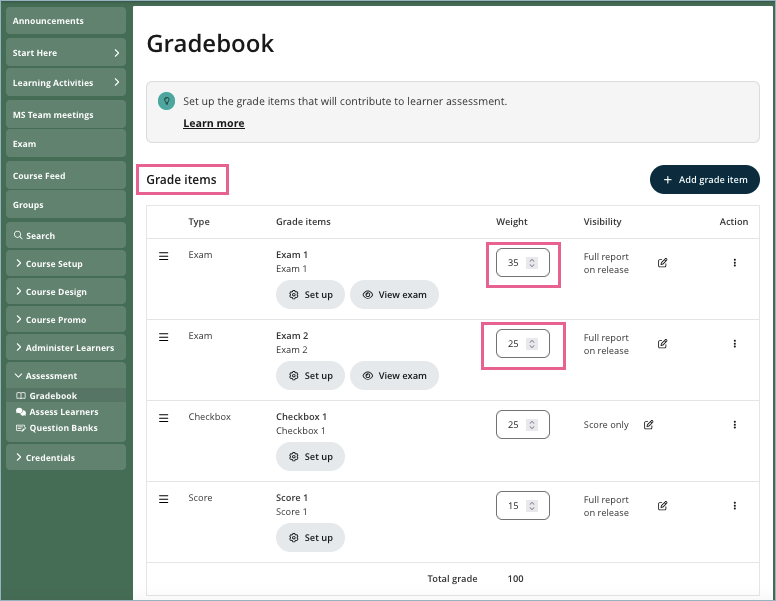
Example 1:
You set the Grade Item Weight to 25. The exam is out of 50.
e.g. The maximum points that can be added to a learner’s final course grade is 25:
- A learner scores 50/50 in the exam will have all 25 points added to their course score.
- A learner who scores 20/50 in the exam will have 10 points added to their course score: (20/50) × 25 = 10
Example 2:
You set the Grade Item Weight to 25. For simplicity, the exam is also out of 25.
e.g. The maximum points that can be added to a learner’s final course grade is 25:
- A learner scores 25/25 in the exam will have all 25 points added to their course score.
- A learner who scores 10/25 in the exam will have 10 points added to their course score.
Level 2: The Exam Score (Assessment Total)
This is the score students see right after completing the exam (e.g., "You scored 40/50").
It is the sum of all Question Weights.

Example:
Your Midterm has 3 questions with the total of 50 points.
- Question 1 Weight: 10 points
- Question 2 Weight: 20 points
- Question 3 Weight: 20 points
Total Exam Score displayed to student: 50 Points.
Level 3: Each Question
Each question has two key values:
- Question Weight: Points this question is worth on the Exam (as above).
- Total Raw Score: Sum of all the Response Scores inside this question
How it works:
The system looks at the percentage the student achieved on the Total Raw Score, and gives them that same percentage of the Question Weight.
Example 1:
A question has a raw score of 4 achievable points. It is worth 10 points on the exam.
Question Weight: You decided this question is worth 10 points on the exam.
Total Raw Score: The student earned 2 out of 4 raw points on their answers (50%).
The Result: The student gets 50% of the Weight. They earn 5 Exam points.
Example 2:
A question has a raw score of 4 achievable points. For simplicity it is also worth 4 points on the exam.
Question Weight: You decided this question is worth 4 points on the exam.
Total Raw Score: The student earned 2 out of 4 raw points on their answers (50%).
The Result: The student gets 50% of the Weight. They earn 2 Exam points.
Level 4: Each Response (Parts & Partial Credit)
This is the bottom level. A "Response" is where a learner provides an answer to a specific part of a question.
Multiple Parts: If a question has multiple parts, each part is answered as a separate Response with its own raw score.
Raw scores from all the Responses are added together to give the raw score for the question.
Note on Partial Credit:
Within a Response, depending on the type of response input, you may also be able to assign different point values, e.g. to different choices (e.g. Best Answer vs. Okay Answer).
Example: Two part question
Part A (2 points): "Where does it occur?" (Multiple Choice)
Choice A (Chloroplasts) → 2 Raw Points (Correct)
Choice B (Mitochondria) → 0 Raw Points (Wrong)
Part B (2 points): "What is the primary output?" (Multiple Choice with Partial Credit)
Choice A (Glucose) → 2 Raw Points (Best Answer, all the points)
Choice B (Energy) → 1 Raw Point (Vague Answer - Partial Credit, half the points)
Choice C (Water) → 0 Raw Points (Wrong, no points)
Total Available Raw Score: 4 Points. (Raw Score)
For more information on response-based scoring in the multiple-choice widget, please refer to the article How do I use the Multiple choice response (including scoring options).
Summary
Raw Scores reflect how well a student answered each part (Response).
Weights determine how much each question and exam counts toward the course.
The system uses raw scores to calculate the percentage earned per question, then applies the question weight, sums across questions to get the exam score, and finally scales to the Grade Item Weight for the final course grade.
Suggestions for Simple Scoring
If you want to avoid confusing scaling calculations, the best strategy is to align your points across all levels so that 1 Raw Point = 1 Exam Point = 1 Course Point.
Step 1 (Course Level): Decide the Exam's worth (e.g., 20 points). Set the Grade Item Weight to 20.
Step 2 (Exam Level): Build your exam so the total of all Question Weights is 20.
Step 3 (Question Level): For each question, ensure the Question Weight matches the Raw Score.
Example: If a question has a Raw Score of 4 (e.g. 4 correct answers), set the Question Weight to 4.
Why: This removes all hidden calculations. The score the student sees on the specific question is exactly what is added to the gradebook.
Question Bank Points vs Exam Points
Each question in the Question Bank has a point, and this point determines how much that question contributes to the exam grade item.
For more information on how to set the point in the Question bank, refer to the article Changing the points of each response type.
Even if you set points on the Exam page, the system still looks at the Question Bank point when calculating results.
For more information on how to set the point in the Exam, refer to the article Assign points to the questions that I have added
If the Questions Bank is set to 0, that question contributes no marks — even if answered correctly.
To ensure scores are calculated correctly:
- Keep each question’s point greater than 0 for both Question Bank point and the Exam point (for example, 1).
- You can still use higher points (e.g. 2 or 3) for questions that should carry more marks.
Example:
Your Question Bank contains three questions, and the exam includes all three of them.
| Question | Question Bank point | Exam point | Correct? | Weighted score |
| Q1.a | 3 | 1 | ✅ | (3 / 4) * 1 = 0.75 |
| Q1.b | 1 | Same as above | ❌ | (0 / 4) * 1 = 0 |
| Q2 | 2 | 1 | ✅ | (2 / 2) * 1 = 1 |
| Q3 | 0 | 1 | ✅ | (0 / 0) * 1 = 0 |
| Total | 3 | 1.75 out of 3 weighted marks |
If the exam is worth 100 points total, the learner will get (1.75 ÷ 3) × 100 = 58.33 points.
Please note that in the example above, Q1.a and Q1.b are sub-questions under Q1, which has a total question bank point of 1 and the exam point of 1.
If the learner answers Q1.a correctly, they will receive 0.75 points. If Q1.b is answered correctly, they will receive 0.25 points. If both Q1.a and Q1.b are answered correctly, the learner will receive the full 1 point for Q1 in the exam.
If all points were 0, the learner would get 0/100, even with correct answers.
 Note: Before adding questions to your exam, double-check that each question in your Question Bank has points set above 0.